
Telegram Downloader
Download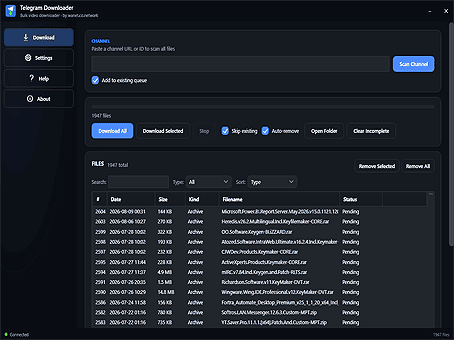
What does Telegram Downloader do?
- Download any channel — public, private, or via invite link
- All file types — videos, audio, subtitles, images, archives and documents
- Original quality — files saved exactly as they were posted
- Resumable, crash-safe downloads — pause or restart any time
- Search, filter and sort the channel content to find exactly what you need
- Works on Windows and Android
Everything it can do
Every capability, plain and simple — so you can decide if it fits how you work.
Download entire channels
Scan any channel — public, private, or via invite link — and grab every file it has ever posted.
Every file type
Videos, audio, subtitles, images, archives and documents — whatever is shared, it can save.
Original quality
Files are saved exactly as they were posted — no recompression, no quality loss.
Resumable and fast
Big files download in parallel parts and pick up where they left off, even after a restart.
Search, filter and sort
Find exactly what you want by type, search term, size or date — download all or just a selection.
Windows and Android
Native apps on both platforms, powered by the same fast, reliable download engine.
Get Telegram Downloader
Available for Windows and Android. Pick your platform and download the latest build — no account needed.
 Windows
 Android
Learn more
How-tos for downloading and archiving Telegram channels.
How to download videos from Telegram
Step-by-step: scan a channel and save its videos, audio and files.
Read guide → ▶Telegram video downloader
What it can save and how to use it on Windows and Android.
Read guide → ▶Archive an entire channel
Back up every video, photo and file to your device in one go.
Read guide → ▶Install & get started
Windows and Android setup in four simple steps.
Read guide →